
The short answer is yes—but please don’t panic.
We regularly hear stories about large companies being hacked and millions of people’s details being stolen. A small business website can feel like a completely different world. You may not sell anything online, store particularly exciting information or have thousands of visitors every day.
Sadly, none of that makes your website invisible.
It probably won’t be personally selected by a mysterious person in a dark room wearing a hoodie. The reality is far less dramatic. Many attacks are automated, with programs roaming around the internet looking for websites with a weakness they can exploit. Your website simply needs to be in the wrong place, with the wrong weakness, at the wrong time.
I have dealt with several hacked websites over the years. I find the world of hacking fascinating—I love investigating, so I suppose it makes sense. Some hacks have been spectacularly obvious. Others have been extremely clever and almost impossible to spot by simply looking at the website.
And that is really the point of this article. A hacked website does not always look hacked.
Not All Hacks Look Like Hacks
The first hacked website I dealt with was in 2014.
There was absolutely no doubt about what had happened. The entire website had been replaced by a black page announcing, in enormous red letters, that it had been hacked. There were political and religious messages, links to the hackers’ accounts and even an attempt to play music automatically.
It was not subtle.
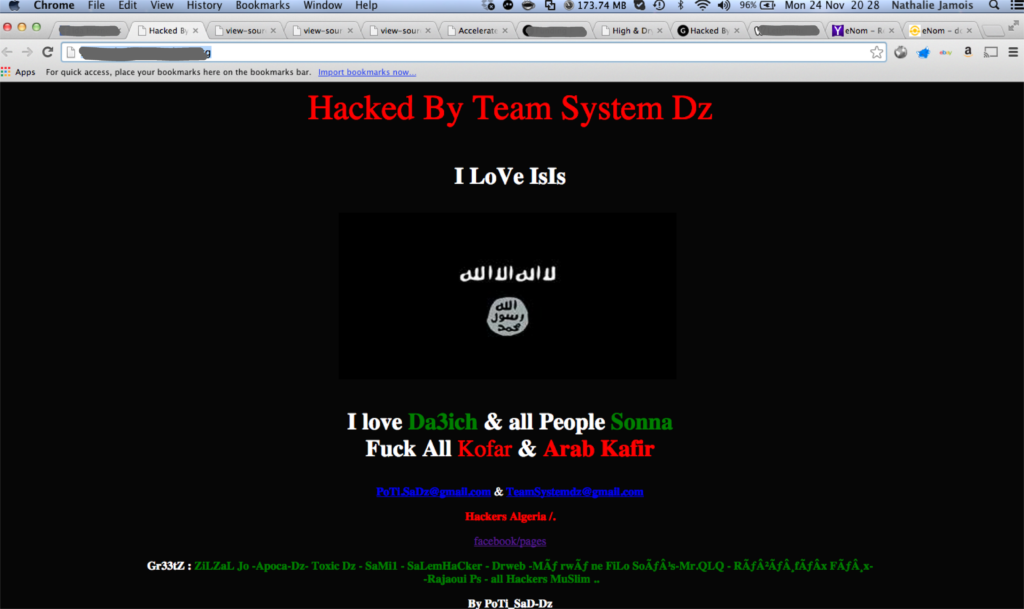
Unsurprisingly, the first thing we did was take the website offline.
The group named on the page was called Team System DZ. I later found an analysis of their campaign by security researcher Kevin Borgolte. He recorded more than 2,800 websites defaced by the group between December 2013 and November 2014.
His research also suggested that the businesses themselves were not being specifically targeted. The group appeared to be finding insufficiently secured hosting providers and gaining access to numerous websites at once.
Ida’s website had not been singled out. It was simply one of the websites they managed to reach.
I wish I had made better notes at the time. I can no longer remember whether we restored the website from a backup or put up a temporary page while a new one was built.
What I do remember is that it was the first hacked website I had dealt with, and it was what got me interested in hackers—how they work, what they do and why they do it. I find the whole subject fascinating. I also love investigating, so I suppose it makes sense.
A much more recent hack was completely different.
It involved an old website that had not been maintained for some time. The client contacted me because it had stopped working. When I visited it, all I saw was a white page. There were no enormous red letters, no messages and, disappointingly, no music.
But behind that white page, an extraordinary amount had been going on.
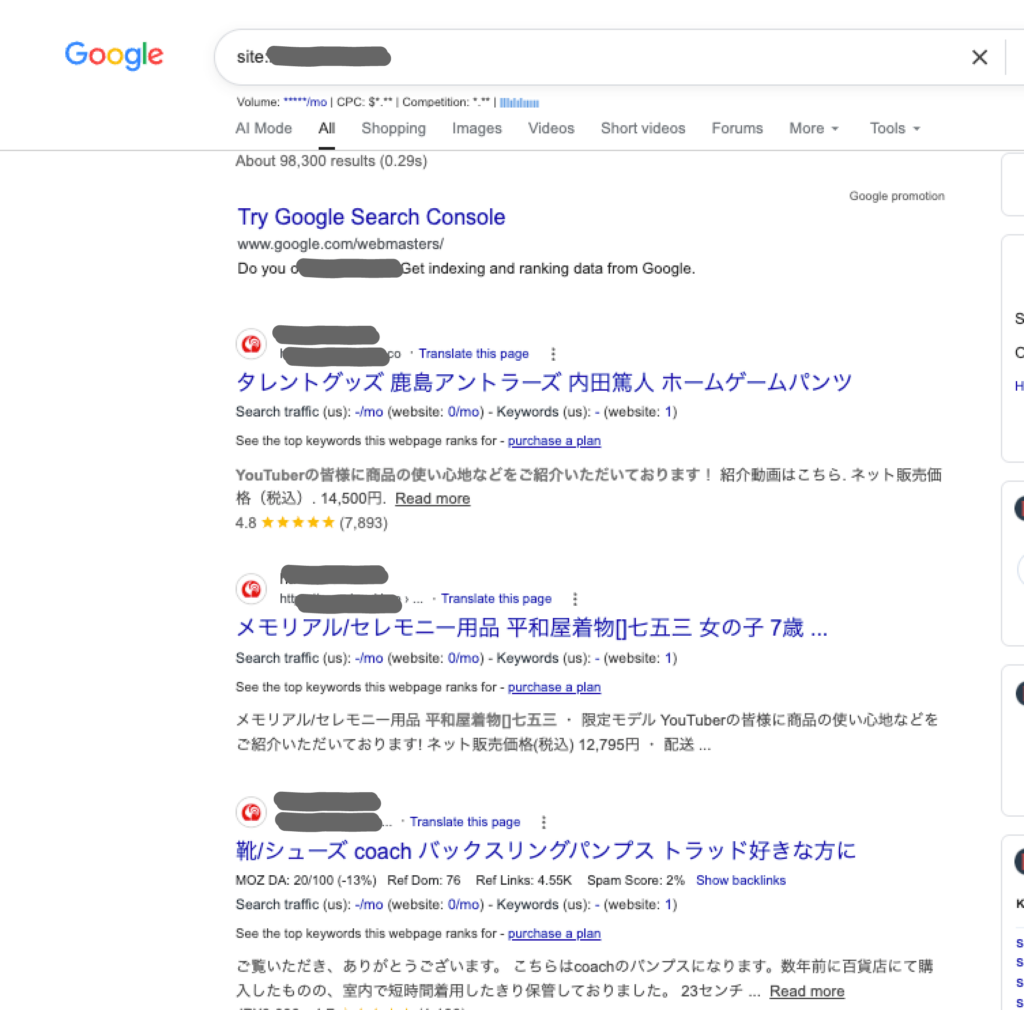
The hackers had created thousands of spam pages connected to the client’s domain. Search engines were shown one thing, while some people arriving through Google were redirected to gambling websites. Someone had even gone through Google’s verification process and made themselves an owner of the website in Search Console.
The genuine website was eventually restored, but that did not mean the hack had been completely dealt with. Malicious pages were still appearing in Google, and the unknown owner still had access to Search Console. The passwords had to be changed, the verification files removed and an obsolete administration system blocked.
I cannot say with certainty whether that old system was how the hackers got in. But its presence was another weakness—and another reminder of what can remain hidden when a website has not been looked after for some time.
The website may have looked normal again, but the problem was far from over.
The contrast between those two hacks has always struck me. The first wanted everybody to know it was there. The second was designed to remain hidden for as long as possible.
One produced an obvious crisis. The other could easily have been mistaken for a completed repair.
Why would anyone hack a small website?
This is usually the part people find difficult to understand. Why go to all that trouble for a small business website?
In most cases, they haven’t chosen the business at all.
Ida’s website was one of thousands attacked by the same group. They wanted somewhere to display their political messages, and her website happened to be one of the places they could get into.
The more recent website was useful in a different way. It already had a domain, a history and pages listed by Google. The hackers could take advantage of that to publish their spam and send people to gambling websites.
A lot of this is automated. Programs search the internet for websites with an opening—a piece of outdated software, a password they can discover or an old system that is still accessible. When they find one, they use it.
They may want to publish spam, redirect visitors, steal information or send emails. Sometimes they want money. Sometimes, as with Ida’s website, they simply want somewhere to display a message.
So even if there is nothing particularly secret or exciting on your website, the website itself can still be useful to somebody else.
It simply needs to be in the wrong place, with the wrong weakness, at the wrong time.
How do they get in?
That is always one of the first things I want to know.
Finding the malicious files tells you what the hackers did once they were inside. It does not necessarily tell you how they got there.
Sometimes there is an obvious culprit: an old plugin with a known security problem, a password that has been used in several places or an administrator account that should have been removed years ago.
Sometimes there are several possibilities.
A WordPress website is made up of lots of different parts. There is WordPress itself, the theme, the plugins, the hosting account and the server it all sits on. Then there are all the people who have—or once had—access to it.
The older the website, the easier it is for things to be forgotten. A plugin may no longer be supported. An old copy of the website may still be sitting on the server. A former developer may still have an account. A piece of software that everybody stopped using years ago may still be available to anybody who knows where to find it.
This was the case with the more recent hack. An old administration system was still accessible. Was that how the hackers got in? Possibly. I cannot prove it, but it certainly should not have been there.
And the route into a website does not always begin with the website. If somebody gains access to your email, they may be able to reset the passwords for your hosting, domain or WordPress account. A very convincing email and a false login page may be all it takes.
It is usually much less exciting than films would have us believe. Nobody needs to sit there typing furiously while lines of green code fly across the screen.
They just need to find something that everybody else has forgotten.
Would I know if my website had been hacked?
Possibly. But not always.
Some hacks are impossible to miss. Your website may disappear, display something alarming or start sending visitors somewhere they most definitely did not intend to go.
Others leave smaller clues. You might discover a new WordPress user you do not recognise, pages you did not create or changes that nobody remembers making. The website may suddenly become slow or behave strangely. Your hosting company, browser or security software may warn you that something is wrong.
Google Search Console can also alert you when Google finds hacked content or something potentially harmful.
But there may be no warning at all.
The recent website I investigated appeared to have been repaired. Its genuine homepage was back and somebody visiting it directly would not have seen thousands of fake pages.
Google had seen them.
When I searched for pages connected to the client’s domain, Google returned about 98,300 results. Most were Japanese product pages that had nothing whatsoever to do with the business.
What should I do if my website has been hacked?
If you have a web designer or somebody who looks after your website, contact them.
If you don’t, this would be a very good time to find one. (Sorry—it was beyond my control!)
Most people would not know where to begin with a hacked website—and there is no reason why they should. This is not the ideal moment to teach yourself how WordPress files, databases and server logs work.
Tell whoever is helping you exactly what you have noticed and when you first noticed it. Send screenshots if you have them, but don’t start deleting files, installing security plugins or restoring backups at random. You may remove useful clues or make the problem more difficult to untangle.
If you cannot reach anybody who knows the website, contact the hosting company. They may be able to suspend it temporarily or help prevent it from causing further harm while you find somebody to investigate it properly.
The important thing is not to ignore it because the homepage appears to be working again. As I discovered with the recent hack, getting the visible website back is not necessarily the same as removing the hackers or repairing all the damage they left behind.
And if the website holds personal information, you may also need advice about whether the incident counts as a reportable data breach. That needs to be considered quickly, not several weeks later when somebody happens to remember it.
Will my website be safe once it’s cleaned up?
That depends on what “cleaned up” means.
If somebody has removed the most obvious malicious files and the homepage is working again, then no. That is not enough.
A backup is not always the complete answer either. It needs to be from before the hack, and you need to be confident that it is genuinely clean. Restoring a backup containing the same outdated software or forgotten system could put the website straight back into the condition that allowed the problem to happen.
Cleaning a hacked website means more than making it work again. It means checking the website, its users, its hosting and the services connected to it. It also means trying to understand how the hackers got in—even if, frustratingly, there is not always a definite answer.
Will it then be completely safe?
No web designer can honestly promise that. What we can do is remove what we find, deal with the weaknesses we identify and look after the website properly afterwards.
How can I make my website safer?
By making sure it is properly maintained.
The word “properly” is important.
For many website owners, maintenance means logging into WordPress, seeing that updates are available and pressing the update button. Once the little red numbers have disappeared, the job appears to be done.
And why wouldn’t it? WordPress makes the process look very simple.
But installing updates is only one part of maintaining a website. Somebody also needs to know whether the updates are appropriate, whether they have affected anything else and what to do if one of them goes wrong.
The backups need checking. Old accounts and software need removing. Security warnings need investigating. Forms need testing. The hosting, domain and connected services need to be kept in mind too.
That does not mean every business owner needs to learn how to do all of this. Most people have businesses of their own to run.
It means somebody needs to be responsible for it.
The buttons may be simple. The responsibility behind them is not.